
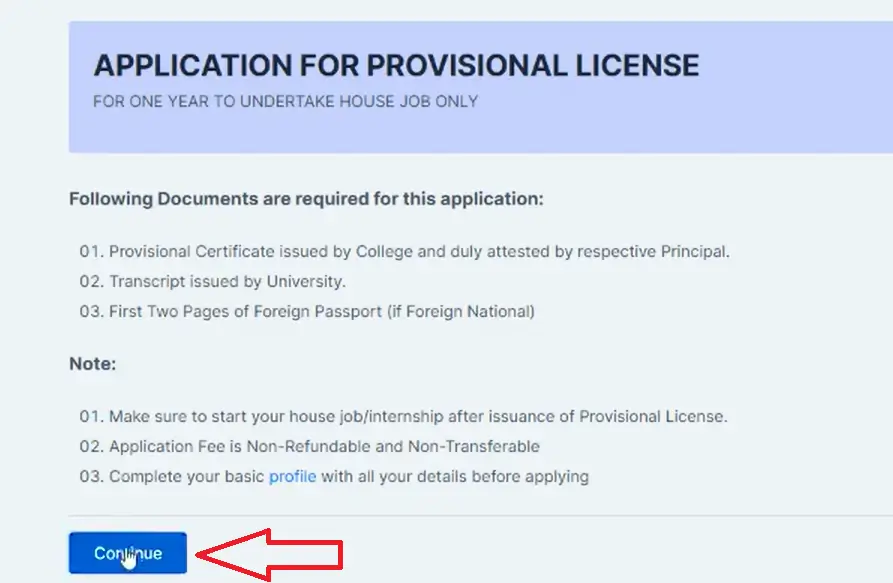
If you’re a fresh MBBS graduate starting House Job, the PMDC Provisional License (PRMP) is the temporary license required to practice under supervision during internship/house job and to be formally recognized as a licensed practitioner-in-training (as per PMDC’s online licensing workflow).
Before you start: What you need to arrange (documents + attestations)
1) Academic record from your medical college
Collect Final Year Marksheet or Consolidated Transcript (officially issued + stamped).
(Your college administration/exam branch typically issues these.)
2) Provisional Certificate from your university
Request a Provisional Certificate from the University Examination Department confirming completion of MBBS.
3) Attestation by Principal (important)
Get the Provisional Certificate attested by your College Principal (as per common PMDC practice followed by colleges).
(Keep the stamp clear and signature visible.)
4) Prepare clean scans (PDF/JPG) under 5 Mb
Scan and save:
- CNIC (front/back)
- Provisional Certificate
- Marksheet/Transcript
- Recent passport-size photograph
Make sure files are legible and not blurred.
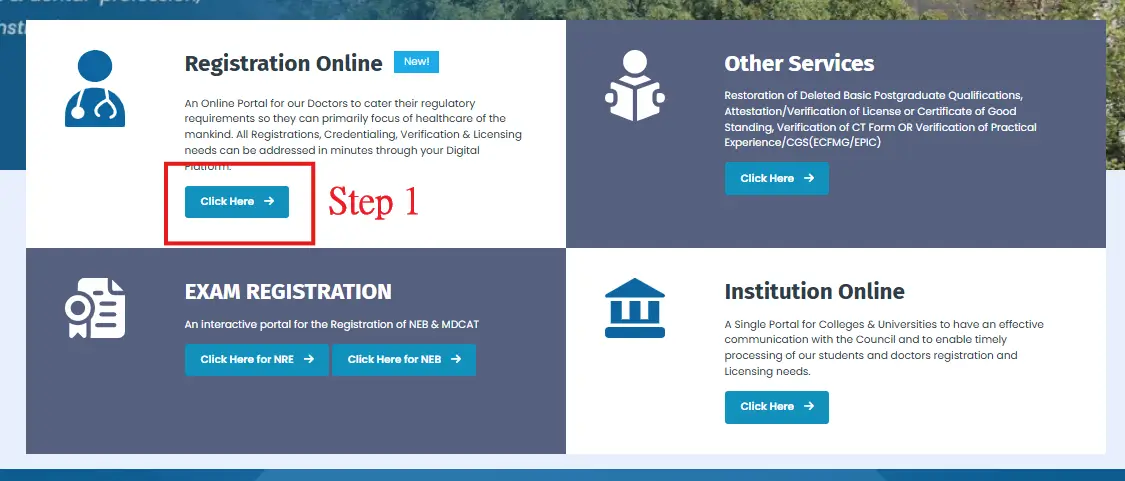
Step 1 Check your PMDC Student Registration online (verification)
Before applying, verify your Student Registration on the PMDC website using:
- Registration number / CNIC, or
- Name / Father name search
If you can’t find your record, PMDC explains that universities upload graduate data on the graduation portal; students can only apply once that data is uploaded.
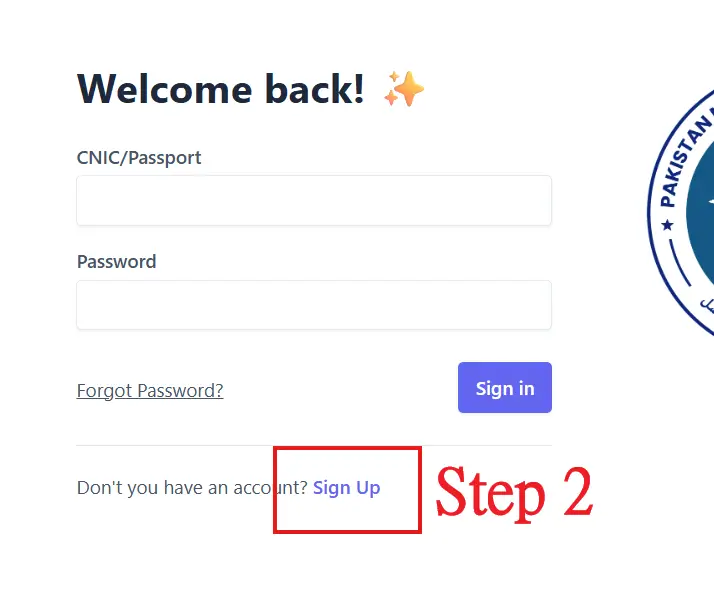
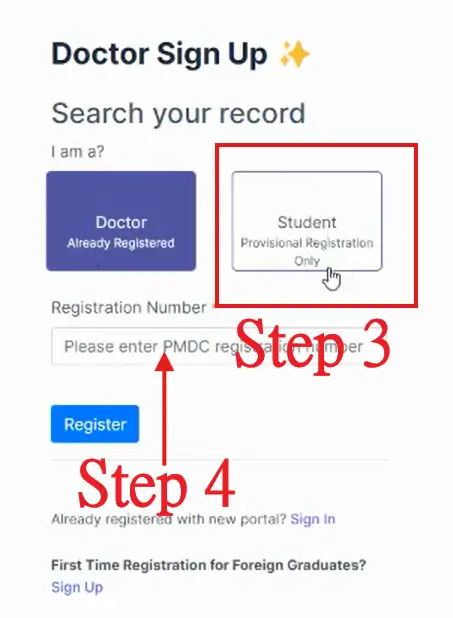
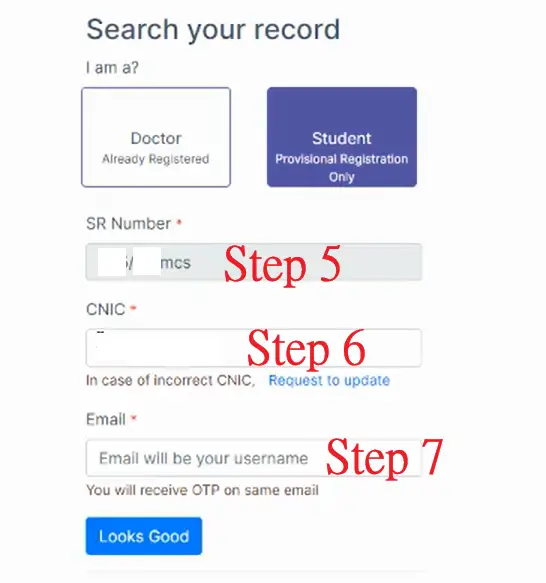
Step 2 Create your PMDC Portal account (Sign-up + Login)
- Go to the PMDC Portal sign-up page (the portal PMDC uses for applications).
- Create your account using your verified student registration details.
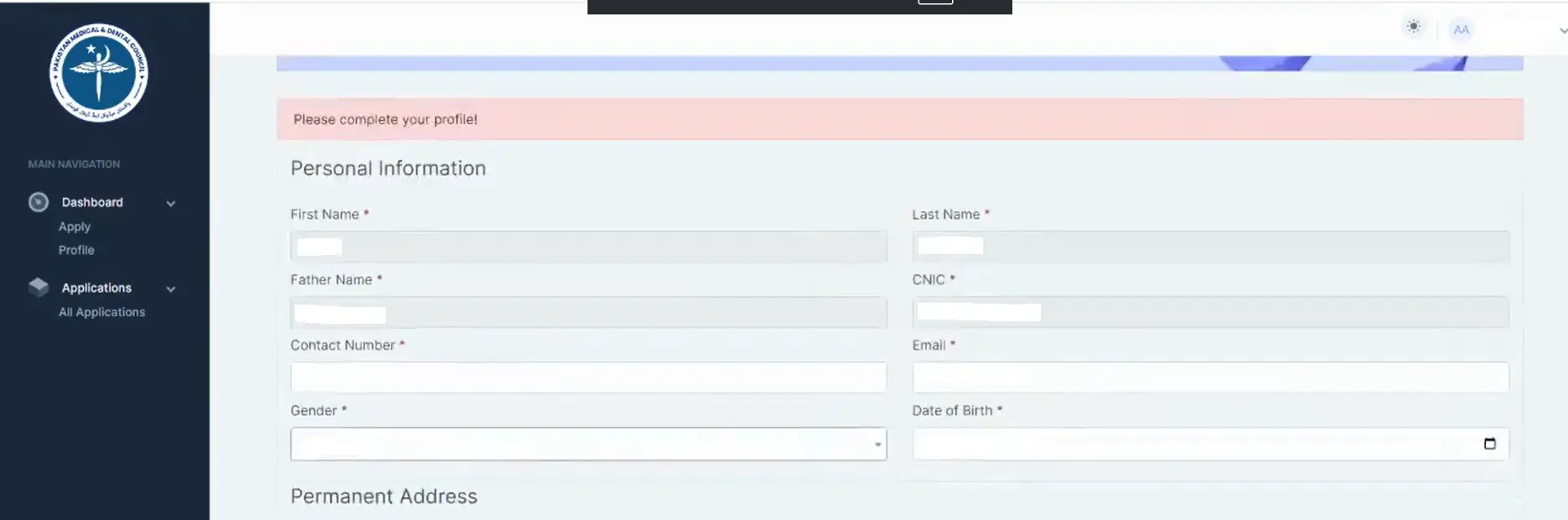
- Login and open your Dashboard.
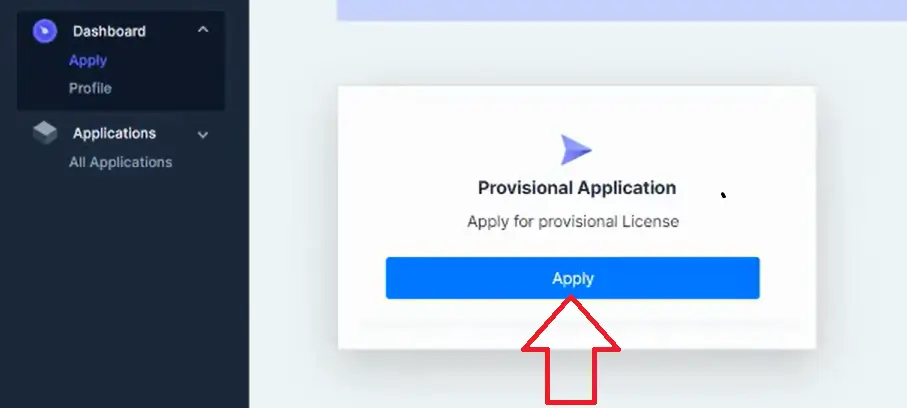
PMDC’s official FAQ confirms the workflow: go to Dashboard → select application form → fill fields → attach documents/photos → choose payment method → submit.
Step 3 Apply for PRMP (Provisional License) on Dashboard
Inside your portal Dashboard:
- Select Provisional License application form
- Fill required details carefully (name spellings, CNIC, address for dispatch)
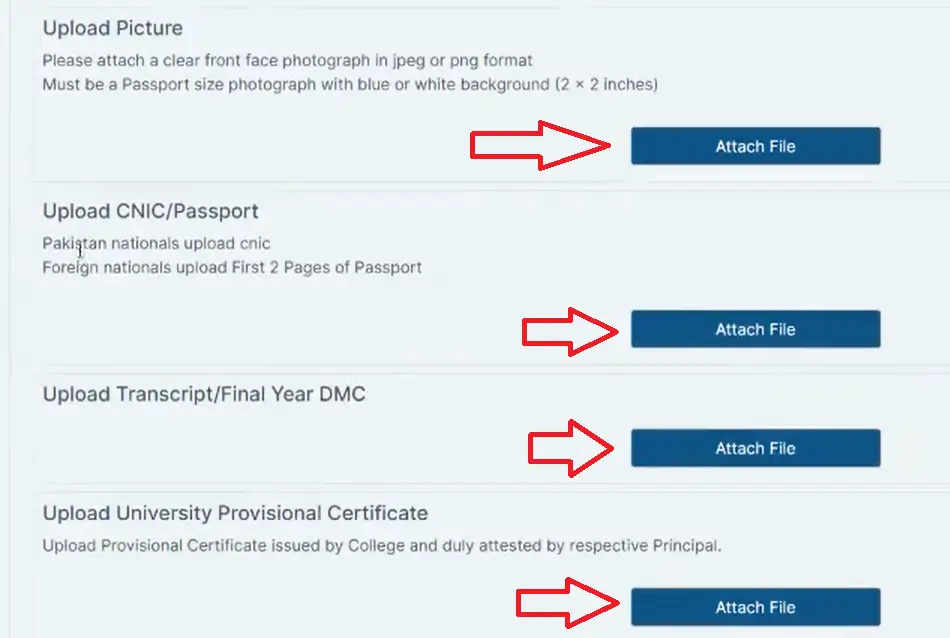
- Upload documents (CNIC, Provisional Certificate, Marksheet/Transcript, photo)
- Choose payment method
- Click Submit
Step 4 Pay PMDC license fee (PRMP)
PMDC’s official fee schedule (FAQs) lists:
- Provisional license (local graduate): Rs. 3000
- Provisional license (foreign graduate): Rs. 10,000
(Your portal typically supports online payment options; follow what appears in your Dashboard.)
Step 5 Track application status (online)
To check progress, PMDC advises logging in and checking application status on the portal.
Your provisional license is generally dispatched to the postal address you entered so put a complete address and active phone number. PMDC uses the same dispatch principle across its certificates.
PMDC Contact Numbers (Licensing + IT + Student Registration)
For faster help, PMDC provides a main line with extensions and separate helplines:
Main UAN / Head Office
- 051-9190000 (dial relevant extension)
Key Extensions
- Registration / Licensing: Ext 102 / 110
- Student Registration Section: Ext 104
- IT Section: Ext 402
Mobile Helplines
- Registration Helpline: 0316-8227638
- IT Helpline: 0316-8227640
Licensing email (official)
PM&DC Complaint Portal (Online)
If your application is stuck, verification is not reflecting, or you need to lodge a formal complaint, PMDC runs a dedicated complaints system.
The complaints login page also notes that if you don’t have an account, you should first create one on the PMDC main portal, and for issues contact PMDC IT via it.section@pmdc.pk.
Extension / Renewal of Provisional License (PMDC)
If your provisional license needs continuation/renewal, PMDC states:
- Renewal is submitted from your Dashboard (select renewal form → upload documents/photos → choose payment → submit).
- Late fee logic (as per PMDC FAQ): Late fee + remaining period fee + further extension period fee (if applicable after expiry of 6 months after validity).
(Exact amounts for late/extension components can vary by policy updates always confirm inside your portal fee challan screen.)
Common issues & quick fixes
“Not eligible to apply / record not found”
PMDC clarifies that students can only apply after graduation once the university uploads data to the graduation portal; if not, contact your college/university to upload/resolve.
“Technical errors / credentials don’t match / payment pending”
PMDC advises basic troubleshooting (refresh/clear cache) and contacting IT Help Desk (Ext 402 / email).