The PSI Calculator helps doctors quickly find the pneumonia severity index for patients with pneumonia. In the clinic, many patients arrive every day who need fast decisions about where they should be treated. Doing the PSI score by hand takes time and can be hard when the ward is busy. I faced this challenge again and again in real practice. To fix this problem and make care faster and safer, I built the PSI Calculator so clinicians can enter the numbers, get the score right away, and use it in study, ward work, and critical care.
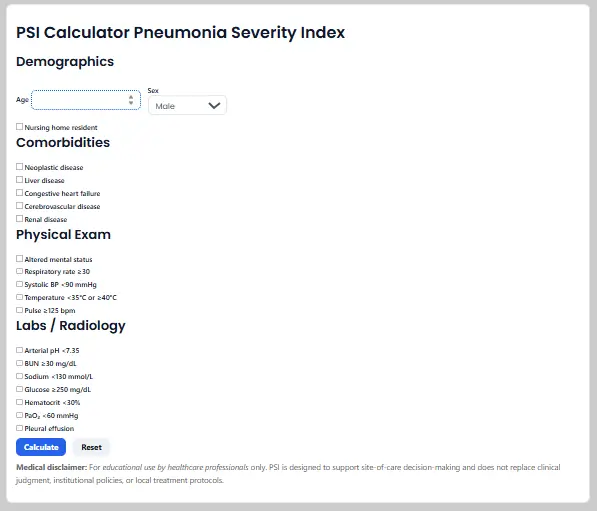
You can follow along using the PSI Calculator while reading this guide.
By the end you will know how to enter the minimum data that moves the class, how to avoid common mistakes that skew risk, and how to translate a class into a site of care plan that is consistent with guideline logic for adult community acquired pneumonia.
What This Measurement Means In Medicine
The pneumonia severity index estimates short term mortality risk in adults with community acquired pneumonia by assigning points to age, comorbidity, selected vital signs, basic labs, and a small set of imaging and blood gas findings. The total maps to five risk classes. Lower classes generally support outpatient care when clinically stable, while higher classes usually require inpatient management and sometimes intensive care. The score was derived and validated in large cohorts and remains a standard tool for site of care decisions.
Temperature in degrees Celsius. Blood pressure and PaO₂ in millimeters of mercury. BUN in milligrams per deciliter. Sodium in millimoles per liter. Glucose in milligrams per deciliter. Hematocrit in percent. These appear in the BilalMD form under Demographics, Comorbidities, Physical exam, and Labs and Radiology.
Two quick ways the calculator saves time
First, it lets you turn a page of observations into one risk class that structures a site of care discussion. Second, it shows you whether a single abnormal datum such as respiratory rate at or above thirty or a very low systolic pressure moves the class enough to change disposition.

Unit Conversions You Will Use Most
One millimeter of mercury equals about zero point one three three kilopascal. Use this when a blood gas prints oxygen in kilopascal and you want the familiar millimeters of mercury.
One centimeter of water equals about 0.735mm of mercury. Use this to compare ventilator pressures with arterial pressure numbers during case review.
One pound per square inch equals about 6894.7 pascals. You will see this in equipment specifications and gas supplies.
A quick water column rule near room temperature is that one pound per square inch is about two point three one feet of water. This helps sanity check pressure heads when you plan oxygen or air delivery from cylinders or pumps.
If you enter values exactly as reported in the chart and on the BilalMD form you will rarely need conversions, but these relations are helpful when a device reports a different unit family than the calculator expects.

How To Use The Calculator Correctly
Follow this numbered workflow while the BilalMD page is open.
- Open the PSI Calculator. In Demographics enter age in years and select sex. The score subtracts ten points for female sex. Check nursing home resident only if true at presentation.
- Under Comorbidities tick each condition present in the record. Neoplastic disease. Liver disease. Congestive heart failure. Cerebrovascular disease. Renal disease. If uncertain, leave it unchecked and verify.
- Under Physical exam tick findings present now or on arrival. Altered mental status. Respiratory rate at or above thirty per minute. Systolic blood pressure less than ninety millimeters of mercury. Temperature less than thirty five or at or above forty degrees Celsius. Pulse at or above one hundred twenty five.
- Under Labs and Radiology tick items from the most recent results. Arterial pH less than seven point three five. BUN at or above thirty milligrams per deciliter. Sodium less than one hundred thirty millimoles per liter. Glucose at or above two hundred fifty milligrams per deciliter. Hematocrit less than thirty percent. PaO₂ less than sixty millimeters of mercury. Pleural effusion present.
- Press Calculate. The tool displays total PSI points, risk class from I to V, a typical thirty day mortality band, and a short site of care note. Record the class in your note.
- Perform a quick cross check. Confirm that any box that pushed the class upward is correct and current. Typical drivers include respiratory rate, low systolic pressure, altered mental status, BUN, low sodium, and low oxygen.
Try it now: Open the PSI Calculator and follow these steps as you read.
Guidance on three sensitive points
Choosing unit sets. Use reported lab units as shown. If your PaO₂ is given in kilopascal, convert to millimeters of mercury before you decide whether to tick the PaO₂ box which uses a threshold of less than sixty millimeters of mercury.
Significant figures. Enter whole numbers as displayed. The PSI thresholds are broad so excessive rounding does not help.
Gauge versus absolute. Blood gas pressures are absolute as reported by the analyzer. Ventilator pressures and gas regulators often display gauge. This distinction does not change your entries for PSI because the form asks for specific clinical thresholds rather than raw device gauge pressures.
Mini Tutorials For Common Medical Tasks
Convert PaO₂ between kilopascal and millimeters of mercury for the PaO₂ box
If a blood gas shows PaO₂ as ten kilopascal multiply by about seven point five. Ten times seven point five gives about seventy five millimeters of mercury, which is above the sixty threshold, so you would not tick the PaO₂ low box. If the value were seven kilopascal the estimate is about fifty three millimeters of mercury and the box would apply.
Rapid classing for a case note
A sixty eight year old man, community dwelling, with no listed comorbidities. Respiratory rate thirty two. Systolic pressure one hundred. Temperature thirty seven point eight. Pulse one hundred ten. Mental status normal. BUN twenty six. Sodium normal. Glucose normal. Hematocrit normal. PaO₂ sixty five. No effusion. Enter the data, tick respiratory rate at or above thirty, and leave the rest of the threshold boxes off. Calculate and document the class. Add oxygen needs and social support to your disposition note.
Translate a class into a site of care plan
Classes I and II usually fit outpatient care when oxygen is stable and support is available. Class III often fits observation or a short inpatient stay. Classes IV and V usually call for inpatient management and may need higher level monitoring. Align with current adult CAP pathway language.
Quick sanity checks before you rely on the output
For a very young adult with few boxes checked, expect the total near the age value adjusted for sex and a low class. For an older adult with several abnormal items, expect a class in the upper range. If your output does not match this sense check, reread the boxes that add the largest points. Use the MSD Manual point table to remind yourself which items carry heavier weights.
Common Mistakes And Fast Fixes
Using the wrong unit family for PaO₂. Fix by converting kilopascal to millimeters of mercury before deciding on the threshold box.
Checking an old value rather than the current assessment. Fix by using the most recent vitals and labs from the chart that reflect the present state.
Confusing urea with blood urea nitrogen. Fix by confirming the unit on the lab header. Convert only if needed for the threshold.
Assuming the class is the admission decision. Fix by pairing the class with oxygen needs, comorbidity burden, and local pathway rules.
Rounding too aggressively on borderline values. Fix by entering integers as reported and reassessing once labs or repeat vitals return.
Field Notes For Busy Clinicians
Run the calculator once at triage and again when the first set of labs posts. The class can shift when BUN or sodium returns.
Teach interns to identify the few boxes that most often move the class in your setting. Respiratory rate. Low systolic pressure. Altered mental status. BUN. PaO₂.
If class and clinical sense diverge, assume a data entry issue first, then consider atypical physiology or mixed diagnoses.
When documenting disposition, write the class and name the one or two drivers that justify the plan. This improves clarity during handoff.
Bookmark the BilalMD PSI Calculator and your local CAP pathway so both are one click away during calls.
FAQ
How is psi calculated
Each input adds or subtracts points that sum to a total which maps to a class from I to V. The mapping and mortality bands come from the original derivation and validation work
What is the PSI score interpretation for pneumonia patients?
Class I and Class II are low risk and often suitable for outpatient care when stable. Class III can be managed in observation. Class IV and Class V are higher risk and usually need inpatient management with close monitoring.
What is the CURB 65 score and how does it compare to the PSI score?
CURB 65 is fast and simple, which helps at triage. PSI uses more variables and is often preferred for site of care decisions when labs and imaging are available. Use CURB 65 as an interim screen and confirm with PSI when data are complete.
What does the PSI score measure and why is it important?
It estimates short term mortality risk in adult community acquired pneumonia and supports safer placement decisions. Using the score gives you a shared language for teams and improves consistency of admission choices.
How is the PSI score used in pneumonia management?
Use the class to plan site of care, prioritize monitoring, and discuss risk with patients and teams. Pair the class with oxygen needs, comorbidity burden, and your local antibiotic pathway.
Conclusion And Next Steps
You can now operate the PSI Calculator with confidence. Pick the correct unit, enter only current findings, and press Calculate to obtain total points and class. Run a quick sense check and document the one or two drivers that matter. For practice, open the page, run two sample cases, save one unit conversion constant you use often, and verify one output against a quick rule before you finalize site of care.